














If you’re wondering What is Schema Markup, it is a critical advancement in SEO and digital marketing. Schema Markup, also known simply as Schema, refers to a structured data code (known as semantic vocabulary) that you can add to your website, allowing search engines to better understand your content. These codes help search engines identify the relationship between the entities mentioned on your website and the queries users enter in the search bar.
As a result, search engines can display more relevant and accurate results on search engine result pages (SERPs) when users enter a query. This is why schema markup has become an essential part of any SEO strategy and should be incorporated into your digital marketing plan for improved visibility and higher rankings.
What is Schema Markup in SEO?
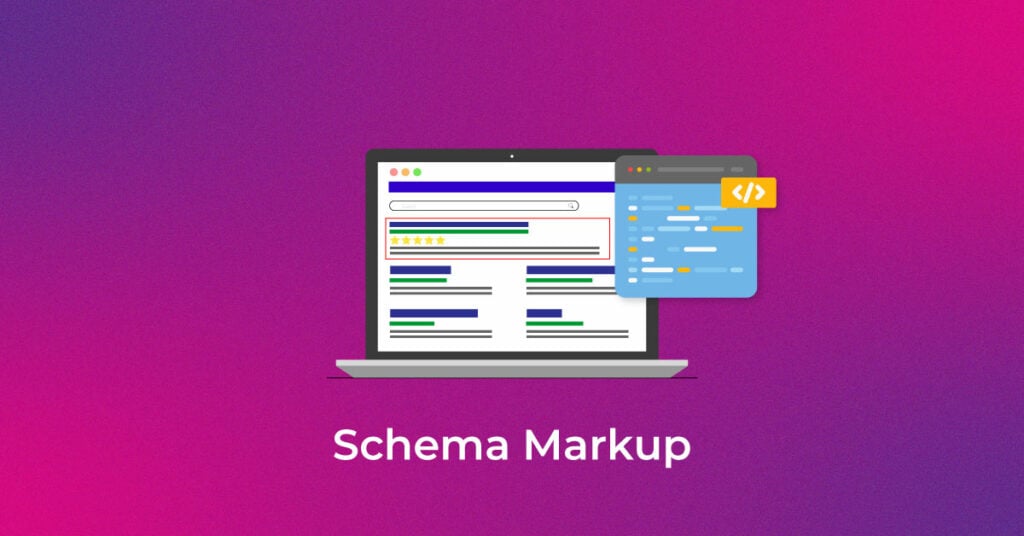
To understand what is Schema Markup in SEO, it’s important to know that it is a form of structured data that helps search engines clearly interpret the content on your website. By adding schema markup to your webpage’s HTML, you provide detailed context about your content, enabling search engines to generate rich snippets in search results. These snippets may display star ratings, product prices, event details, FAQs, and more—making your listings more informative and engaging for users.
Implementing schema markup in SEO improves your website’s visibility by making it easier for search engines to categorize and display your content. The more accurate the search engines are at interpreting your data, the higher your chances of ranking better on SERPs.
What is Schema.org?
Schema.org is a collaboration between major search engines like Google, Bing, Yahoo!, and Yandex to standardize the structured markup used to describe content on the web. By following the Schema.org guidelines, you help search engines display more relevant results for user queries, ensuring a better user experience and improved search rankings.
How Does Schema Markup Work?
Schema Markup works by embedding structured data into the HTML of a webpage, helping search engines clearly understand the content. When search engines crawl your website, they use this structured data to categorize and display relevant details as rich snippets in the search results.
For example, when you add SEO schema markup for a product, search engines can display additional information such as price, availability, and ratings directly in the search results. Similarly, using FAQ schema enables search engines to show a question-and-answer format in the search results. By using schema markup, businesses can improve their search visibility and enhance the click-through rate (CTR) by providing more valuable and detailed information to users.
Let’s try to understand this with a real-time scenario:
Webmasters are familiar with the HTML tags that can be used on a webpage. These HTML tags only tell the browsers how to display the information added within the tags. For example, <h1>Apple</h1> will display the text “Apple” in a heading 1 format. However, it does not provide any data about what the text means. Here, “Apple” could refer to a fruit, or it could refer to the brand ‘Apple’ whose electronic products are popular among people. This can cause ambiguity among search engines while displaying the search results on the SERP. You can resolve this by adding ‘Organization Schema’ to the webpage of Apple Inc., telling Google bots that the page is about a company or an organization and not a fruit.
Schema markup combined with the RankBrain algorithm and Google’s BERT update will help you find the most relevant answer on SERPs for your search query.
Why is Schema Markup Important for SEO?
Schema markup is essential in SEO because it helps search engines interpret and display your content more effectively. This leads to better search result displays, increased visibility, and higher click-through rates (CTR). Implementing SEO schema markup improves the relevance of your content, ensuring that it is indexed correctly by search engines.
Here are the benefits of schema markup for SEO:
- Enhances Search Appearance: Enables rich snippets, knowledge panels, and featured snippets in search results.
- Improves CTR: Makes search results more engaging, encouraging users to click on your site.
- Boosts Content Relevance: Helps search engines accurately index and display information from your content.
- Supports Voice Search Optimization: Structured data helps improve voice search results, making content more accessible.
- Increases Organic Traffic: With better search visibility, your site attracts more potential visitors.
Incorporating schema markup in SEO allows businesses to stand out in search rankings, gain a competitive edge, and improve overall user experience.
What is semantic search?
The term semantic refers to the study of meaning or logic in a language. Semantic search is a technique that allows search engines to interpret a search query based on the intent behind it, rather than just focusing on the keywords. This means that search engines now consider the context and meaning of the words used in a query to generate more accurate results.
Schema markup plays a crucial role in semantic search. By providing structured data about your content, schema markup helps search engines understand the context and meaning behind the terms on your website. This makes it easier for search engines to match your content with user queries, improving the accuracy and relevance of the search results.
Why is schema essential for semantic search?
If semantic search involves understanding the context and intent behind a query, then schema markup is the key to providing that context. When you add structured data to your content, you’re providing search engines with the “vocabulary” they need to understand the meaning behind your text. This allows search engines to deliver more accurate, context-based results.
By using schema in SEO, you’re ensuring that search engines can better match and display your content when users search for something related to your business. For example, if your website features a speech, schema markup helps search engines identify and present this content properly to users, ensuring they get the most relevant search results.
What are the Different Formats of the Schema Markup?
There are three common formats of schema markup:
- JSON-LD: This is Google’s preferred format for schema markup. It can be placed anywhere on a page using a script tag, and it’s easy for webmasters to implement without interfering with the page’s content or rendering.
- Microdata: This involves adding tags directly to the HTML code of your page, making it a bit more complex to implement, especially if you aren’t familiar with coding.
- RDFa: Similar to microdata, RDFa is an extension of HTML5 and uses inline tags to mark up metadata within a webpage.
Is Schema Markup a Rankings Factor?
While schema markup helps search engines understand your content better and improve how it is displayed, it is not a direct ranking factor. Google’s John Mueller has clarified that schema markup itself does not directly impact search rankings. However, schema markup enhances search appearance by creating rich snippets and improving CTR, which indirectly impacts rankings by driving more traffic and engagement.
Check what Matt Cutts has to say about Schema Markup

How to Add Schema Markup to a Webpage (Step-by-Step Guide Using Infidigit’s Schema Generator Tool)
Implementing Schema Markup on your webpage can improve search visibility and enhance rich results. Follow these simple steps using Infidigit’s Free Schema Generator Tool to create and add structured data effortlessly.
Step 1: Visit Infidigit’s Free Schema Generator Tool
To get started, go to Infidigit’s Free Schema Generator Tool. This tool helps you create structured data markup without any coding knowledge. Simply visit Infidigit’s Tools page, and you’ll be able to generate schema markup in just a few clicks.
Step 2: Select the Schema Type (e.g., Product, FAQ, Article, etc.)
Once you’re on Infidigit’s Schema Generator Tool page, choose the type of schema markup you need. Infidigit offers five schema types:
- Article Schema Generator – Ideal for blogs, news articles, and guides.
- Breadcrumb Schema Generator – Helps search engines understand your website’s structure.
- FAQ Schema Generator – Displays frequently asked questions in search results.
- Product Schema Generator – Enhances product listings with rich details like price and availability.
- Person Schema Generator – Provides structured data for personal profiles, including name, job title, and social links.
Simply select the schema type that best fits your webpage’s content.
Step 3: Enter the Required Details in the Tool
After selecting the schema type, fill in the necessary details based on your choice:
- Article Schema – Enter the article title, author name, publish date, and a short description.
- Breadcrumb Schema – Provide the breadcrumb trail, including the homepage and category links.
- FAQ Schema – Add questions and answers that you want to display in search results.
- Product Schema – Input product name, description, price, availability, brand, and review details.
- Person Schema – Fill in details like name, job title, company, social media profiles, and a brief bio.
Make sure all the details are accurate, as this information will be used to generate the schema markup.
Step 4: Generate the Schema Markup Code Instantly
After entering the details, click the “Generate” button. Infidigit’s Schema Generator Tool will instantly create a structured data code in JSON-LD format, which is Google’s preferred format. The tool ensures the schema is correctly structured, so you don’t need any coding knowledge. Review the generated code to confirm that all details are accurate before moving to the next step.
Step 5: Copy and Add the Schema Code to Your Webpage
Copy the generated code and paste it into your webpage’s HTML.
- If you use WordPress, you can add it using a plugin like Insert Headers and Footers.
- If you’re using a custom website, place it in the <head> or <body> section.
Step 6: Validate Your Schema Using Google’s Rich Results Test
Before making it live, check if your Schema Markup is valid using Google’s Rich Results Test.
- Enter your webpage URL or paste the Schema code.
- Click “Test” to see if Google detects the structured data correctly.
Step 7: Test Your Schema Using Google’s Structured Data Testing Tool
For final verification, use Google’s Structured Data Testing Tool.
- Paste your webpage URL or Schema code.
- Click “Run Test” to check for any errors or warnings.
By following these simple steps, you can easily add Schema Markup to your website and improve your chances of appearing in Google’s rich search results!
Important Types of Schema Markup
Schema markup comes in various types, each designed to help search engines understand different types of content on a webpage. Implementing the right schema enhances visibility in search results and improves the chances of rich snippets appearing. Below are some of the most commonly used schema types:
-
Organization Schema

Organization Schema Markup helps search engines understand key business details like name, logo, contact info, and social media links. It enhances brand visibility and ensures accurate information in search results. By using Organization Schema, businesses can display essential details, making it easier for users to find them.
-
Breadcrumb Schema
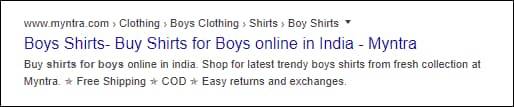
Breadcrumb Schema helps search engines understand a webpage’s structure, improving navigation for users and enhancing search result displays. It creates a clear path showing where a page is located within a website. Implementing Breadcrumb Schema Markup allows search engines to display breadcrumb trails in search results, making it easier for users to navigate your site. You can generate structured data easily using Infidigit’s Breadcrumb Schema Generator and improve your website’s usability.
-
Article Schema
Article Schema helps search engines understand and display key details of an article, such as the headline, author, publish date, and featured image. It enhances content visibility in search results, often leading to rich snippets. Using Article Schema Markup improves SEO by making articles more structured and user-friendly. With Infidigit’s Article Schema Generator, you can easily create and implement the markup, ensuring better indexing and visibility in search results.
-
Event Schema
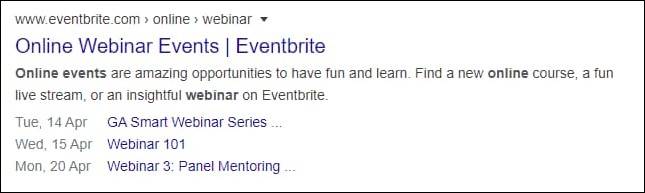
Event Schema helps search engines display key event details like name, date, location, and ticket information in search results. This structured data enhances visibility and improves the chances of appearing in rich snippets, attracting more attendees. By implementing Event Schema Markup, businesses and organizers can ensure their events are easily discoverable.
-
Recipe Schema

Recipe Schema helps search engines understand and display key details about a recipe, such as ingredients, cooking time, nutrition facts, and user ratings. This markup enhances search results by showing rich snippets, making the recipe more appealing and clickable. By using Recipe Schema Markup, food bloggers and websites can improve visibility and attract more traffic.
-
People/Person Schema

Person Schema provides structured data about an individual, including their name, job title, birthdate, social profile, and other relevant details. This helps search engines display rich snippets with key information, making it easier for users to find specific people in search results. Using Person Schema Markup improves visibility and credibility, especially for professionals, authors, and public figures. With Infidigit’s Person Schema Generator, you can quickly generate and implement structured data to enhance your online presence.
-
Local Schema
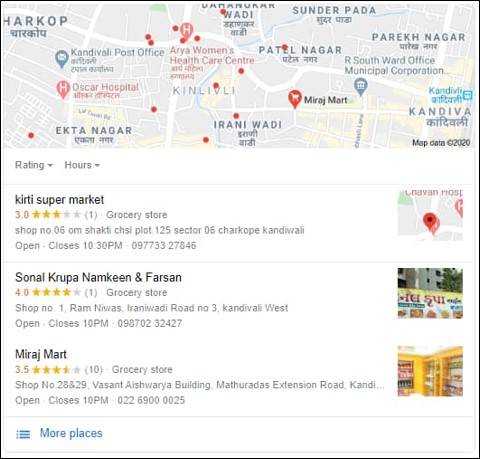
Local Business Schema helps businesses provide structured data about their name, address, phone number (NAP), opening hours, and other key details. This markup enhances search engine visibility, making it easier for users to find accurate business information in local search results and Google Maps. Implementing Local Business Schema Markup can improve local SEO, boost credibility, and increase foot traffic.
-
Product Schema
Product Schema helps search engines understand key details about a product, such as its name, description, price, availability, and reviews. This structured data enhances search results by displaying rich snippets, making products more attractive to potential buyers.
Using Product Schema Markup improves visibility in Google Shopping and organic search. With Infidigit’s Product Schema Generator, you can easily create structured data and integrate it into your webpage for better rankings and higher conversions.
-
Review/Rating Schema

Review/Rating Schema allows search engines to display star ratings, reviewer details, and feedback in search results. This structured data helps users make informed decisions by showcasing product, service, or content reviews directly on SERPs. Implementing Review/Rating Schema Markup can increase credibility and click-through rates.
-
Video Schema

Video Schema helps search engines understand and display video content more effectively in search results. It enhances visibility by enabling rich snippets with video thumbnails, duration, and upload details, improving engagement and click-through rates. By implementing Video Schema Markup, your videos can appear in Google’s video search results and featured snippets.
-
FAQ Schema

FAQ Schema helps structure frequently asked questions on a webpage, allowing search engines to display them directly in search results as rich snippets. This improves visibility, enhances user experience, and increases the chances of capturing more organic traffic. By using FAQ Schema Markup, businesses can provide quick answers to common queries, improving engagement and reducing bounce rates. You can easily generate structured data using Infidigit’s FAQ Schema Generator to optimize your FAQs for better SEO performance.
-
Speakable Schema
Speakable Schema markup enables virtual assistants or even Google assistants on smartphones to retrieve a featured snippet, key point, or take away from specific topics and narrate them to users.
This could be a topic or story’s key points, summary, bottom line, or any aspect of information users will find useful and interesting in a short span of time. Users can listen to updates on the go or at times when they can’t access a tangible interface to access the required information.
Using Schema Markup for SEO
Now that we have understood what is schema in SEO let’s move on to understand how we could use schema markup for SEO benefits.
-
Discover the Most Commonly Used Schemas
The first step in using schema markup for SEO is to get an idea of the most commonly used schemas in your niche or segment. To do this, you can head to schemas.org and check out all the distinct types of schema markups ideal for your business.
-
Use Multiple Schemas in Your Webpage
For the uninitiated, there are different types of schemas. When you visit the portal, you will find types that are suited for different purposes. Depending on your needs and your intention with what to markup, you can use multiple schemas in your webpage.
-
Use More Schemas to Markup Your Various Content Elements
As far as schemas are concerned, the more the better. As you explore the types of schemas, you will begin to understand the purpose and potential of each. So, use all the schemas to markup content that will be visible to your web page visitors. At this point, remember not to markup content that will be hidden at the backend.
What Did We Learn About Schema Markup?
Google does not promise to push your rank higher on SERPs if you include Schema on your page. However, adding schema markup can boost your chances to be featured in the ‘rich snippet’, which in turn can increase your click-through rate (CTR). Implementing Schema Markup in the right way can put you ahead of your competitors in the race for more web traffic.
Let us know what Schema Markup you are using and how it has helped.
What is a schema with an example?
A schema is a structured framework that helps organize and interpret information. In psychology, it refers to a mental pattern that shapes how we understand experiences. For example, a child’s “dog” schema may include features like four legs, fur, and barking, which helps them recognize similar animals.
In technology, a schema defines how data is organized. For instance, a booking database schema may include tables for customers, flights, and payments, all connected to structure information efficiently.







2 thoughts on “What is Schema Markup? Everything You Need to Know”
Amazing and a very informative content
Thanks, do subscribe us for more latest updates.