











Click depth in SEO is how many times someone must click from your homepage to open another page. It shows how simple your site is to use and how easily Google can get to your pages. When key pages are only a few clicks away, Google can crawl them more often and people can find them quickly, which can help those pages rank better.
Why Click-Depth Matters
Pages near the homepage let search engines like Google access them swiftly and regularly. They tend to pick up more internal links and inherit authority from the root page, boosting search performance. Pages stuck deep in the structure get overlooked, face fewer crawls, and risk users bailing out early.
How to Measure Click-Depth
To measure click depth in a simple way, start from your homepage and count how many clicks it takes to open a page using your main menus or links. You can also use SEO tools like Screaming Frog or similar crawlers to see depth levels for every URL on your site in one report. As a rule of thumb, try to keep your most important pages within about three clicks from the homepage.
Understanding the Impact of Click Depth on User Experience
Shallow click depth makes pages easy to reach, so users find what they want fast. Good navigation cuts frustration and keeps folks on your site longer, lifting time spent and sales chances. Deep clicks tire people out quick, so they leave without looking, hurting your traffic and goals.
Users stick around more when top content sits just one or two clicks away. Bounce rates drop as paths feel smooth and natural, like a quick store run. Google spots this happy behavior and rewards your site with better ranks too.
High depth sparks rage clicks or back-button spam, killing trust in your brand. New visitors judge the whole site by that first hunt. Fix it to turn browsers into buyers who share your pages with friends.
Ideal Click-Depth Levels
- Depth 1-3: Shallow pages improve crawlability but don’t guarantee higher rankings.
- Depth 4-5: Okay for support pages, but add internal links to pull them closer.
- Depth 6+: Risky; these pages struggle with crawl budget and traffic.
Explore the Best Practices to Improve Click Depth in SEO
Keep your site’s setup simple to cut down clicks needed to find pages. These steps make navigation smooth for users and easy for Google to crawl your content fast.
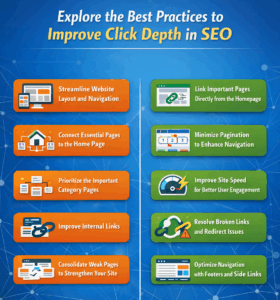
Streamline Website Layout and Navigation
- Make your site’s navigation super easy by organizing content in a clear, logical order.
- Put important pages just 1-2 clicks away from the home page.
- Avoid messy, crowded menus or hiding good content in deep folders.
- This makes users happy—they find what they want fast.
- It also helps Google crawl and rank your pages better with short paths.
Connect Essential Pages to the Home Page
- Your home page gets the most visitors, so use it wisely.
- Add direct links to top services, best products, or popular blog posts right on the home page.
- This lets users reach hot content in just one click.
- Google bots visit the home page often and spot these links quickly.
- It spreads your site’s strength to key pages and boosts rankings over time.
Prioritize the Important Category Pages
- Group items into big, simple categories like “Men’s Clothing,” “Women’s Wear,” or “Kids Gear.”
- Put smaller lists only under these main categories—no deep nesting.
- Users reach what they want in 1-2 clicks.
- Search engines follow these straight paths easily.
- A flat structure keeps crawl depth low, speeds up indexing, and helps all pages rank higher.
Improve Internal Links
- Internal links connect your pages like roads on a map.
- They guide users to related content and show Google your site’s flow.
- Add links to deep pages from high-traffic spots.
- This brings hidden content forward without big changes.
- Users stay longer, and Google passes strength from strong pages to weaker ones for better rankings.
Link Important Pages Directly from the Homepage
- Put sales pages, contact forms, or “Book a Demo” buttons in easy-to-reach spots.
- Link them directly from high-traffic pages near the top.
- Users see them fast and take action without getting lost.
- This boosts clicks, time on site, and actual sales.
- Google notices the smooth access and rewards you with higher rankings from happy user signals.
Minimize Pagination to Enhance Navigation
- Too many “Next” buttons hide content and annoy users.
- Show more items per page or use “Load More” buttons to keep everything in one spot.
- For big sites (500+ pages), add jump links like 1, 2, 3…50…100.
- Crawlers move through faster without endless clicks.
- Users find stuff quicker, drop-offs drop, and rankings improve.
Improve Site Speed for Better User Engagement
- Slow sites frustrate users, no matter the depth.
- Compress images, use caching, and CDNs to load pages fast everywhere.
- Users browse deep areas without waiting or leaving.
- Google loves speed and ranks fast sites higher.
- Snappy navigation keeps visits long and makes your structure shine in searches.
Resolve Broken Links and Redirect Issues
- Broken links or bad redirects stop users and block Google.
- Check weekly with tools like Google Search Console or link scanners.
- Fix them fast to keep paths smooth.
- Users move freely without error pages.
- Bots crawl everything, index fully, build trust, and boost your search positions.
Consolidate Weak Pages to Strengthen Your Site
- Old or weak deep pages dilute your site’s power.
- Pull their best parts into strong, popular pages or update them fresh.
- This reduces overall depth and focuses strength.
- Users stick to quality content without junk.
- Google prefers tight, useful pages, so rankings rise as crawl budget goes further.
Optimize Navigation with Footers and Side Links
- Footers (bottom of every page), breadcrumbs (path trails), and sidebars are always there.
- Fill them with quick links to key spots like “Contact,” “About,” or top categories.
- Gives one-click access site-wide, regardless of depth.
- Users jump or backtrack easily without digging.
- Google follows these paths too, discovering hidden pages for better crawls and rankings.
Common SEO Mistakes Affecting Click Depth
Many simple errors make click depth worse and hurt your site’s rankings. Watch out for these traps that bury content and confuse users plus Google.
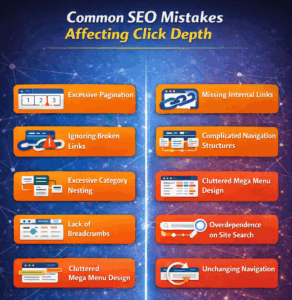
Excessive Pagination
- Too many “next page” links bury your best content deep where no one looks.
- Users click endlessly and give up fast.
- Deep pages may receive less crawl attention, especially large sites.
- Fix it by using fewer pages or “load more” buttons.
- This keeps key items close and easy to reach in one spot.
Missing Internal Links
- Pages with no links to them become invisible ghosts.
- Users can’t find them easily, so clicks pile up.
- Google bots miss them and skip indexing.
- Add links from popular pages to these lonely ones.
- It brings them forward, shares site strength, and cuts clicks for everyone.
Ignoring Broken Links
- Dead links are like walls that block users and Google.
- Half your site gets stuck behind errors, making good paths longer.
- Check links often with free tools and fix them quickly.
- Clean links let users flow smoothly.
- Bots reach every page without dead ends slowing them down.
Complicated Navigation Structures
- Messy menus with endless drop-downs need 5+ clicks for key pages.
- Users get lost, get mad, and leave fast.
- Google wastes crawl time on junk paths.
- Simplify to short, clear menus with big buttons for top items.
- This cuts clicks, keeps users longer, and boosts rankings steadily.
Excessive Category Nesting
- Folders inside folders bury items under 10 layers, like a messy cabinet.
- Example: Home > Shop > Men > Shirts > Blue > Medium—too many taps.
- Flatten into lists no deeper than 3 levels.
- Users reach goals fast.
- Bots crawl easily, and your site feels open and quick.
Cluttered Mega Menu Design
- Crammed mega menus with tiny links turn into confusing mazes.
- Users click wrong and feel deeper than they are.
- Google sees clutter as deep junk.
- Keep them clean: bold groups, big text, key links only.
- Test on phones for easy taps and short paths.
Lack of Breadcrumbs
- No breadcrumbs trap users deep with no quick way back.
- They hit the back button repeatedly instead.
- Google misses your site structure map.
- Add them everywhere: Home > Shop > Item.
- Cuts felt depth, speed finds, and shows bots your layout clearly.
Overdependence on Site Search
- Site search helps users a bit, but Google bots mostly ignore it.
- Deep pages stay hidden without real links.
- Users mistype and still click a lot if results are bad.
- Build proper link paths first, use search as backup.
- Real navigation wins for rankings and visits.
Unchanging Navigation
- Menus built once and never updated let new pages sink deep.
- Old nav ignores hot new spots.
- Clicks grow quietly over months.
- Refresh menus every few months after big changes.
- Match to top user pages from analytics for low depth all year.
Deep URL Structures
- Long URLs like /category/sub/subsub/item signal deep layers to Google.
- Deep URLs reflect complex architecture, not direct ranking factors.
- Users share ugly links less.
- Shorten to /mens-shirts-blue to match flat nav.
- Signals simple structure, boosts shares, and gets more crawl love.
Understanding the Difference Between Click Depth and Crawl Depth
Click depth counts user clicks needed to hit a page from the homepage, all about smooth navigation and happy visitors. It keeps key spots easy to find, boosting time on site and clicks that matter. Shallow paths cut user hassle and lift engagement.
Crawl depth tracks how far a page sits from the homepage in the eyes of Google bots, based on link trails. Search engines favor shallow crawl spots for quick indexing and top crawl priority. Deep ones get skipped or lag behind. Users love click depth fixes because paths feel natural, like walking a straight aisle in a shop.
Both aim for short paths, but click depth serves users while crawl depth feeds bots. Fix them together to sharpen nav, amp SEO, and make your site shine for all. Bots grab crawl depth wins by following clear links, skipping maze traps. Track both in tools like Screaming Frog to spot weak spots fast.
Mix them wrong and users bounce while pages stay unindexed. Smart sites balance both for traffic that sticks and ranks that climb steady. Test changes with real user heatmaps to see the full win.
The Role of Click Depth in Modern Search Rankings
Click depth quietly shapes how both users and search engines experience your site, from first click to final conversion. Keeping key pages within a few clicks of the homepage improves navigation, strengthens internal authority flow, and helps crawlers index content more reliably. When you actively manage click depth with smart structure, internal links, and clean navigation, you create a site that feels simple for visitors and powerful for SEO at the same time.
FAQs
What is a good click depth for SEO?
Target 3 clicks max for core pages like products, services, and blogs. Deeper ones exist but often see thin traffic, low authority, and sparse crawls.
How does click depth affect crawl budget?
Shallow pages let crawlers prioritize content over navigation paths, saving crawl budget. Deep pagination wastes it on endless link-chasing.
Does click depth affect large and small sites differently?
Large sites crave tight control to avoid budget waste in depths. Small ones stay shallow naturally, but sloppy nav still bites usability and reach.
Is reducing click depth enough to fix low-traffic pages?
It boosts exposure, but pair with killer content, intent alignment, and on-page tweaks. Click depth is a key tech lever, not a solo fix.