












Google Search Console just rolled out an exciting update that makes digging into your SEO data way faster and more intuitive. The new AI-powered configuration feature lets you skip the tedious manual setup in Performance reports entirely. No more struggling with filters, date ranges, and dimensions. Just type what you want in normal words like “pages with high impressions but low clicks from India last month” and the AI does the rest. It quickly makes custom insights, charts, and reports just for your question.
This smart tool saves hours for SEO pros, agencies, and site owners, turning complex data analysis into effortless conversations with your search performance metrics.
Key Takeaways:
- Instant AI Setup: Search Console’s new AI feature lets you describe Performance report needs in plain English to auto-apply filters, comparisons, and metrics like CTR or clicks.
- Easy Examples & Limits: Try “sports queries on phone last 6 months” or India specific checks; beta-only for Search results, verify filters, no exports.
- SEO Time-Saver: Frees pros for insights over setup; use simple prompts and feedback for refinements.
What Makes the Performance Report Tough?
The Google Search Console Performance report shines for tracking organic search traffic, like clicks and impressions. But manually picking filters, dates, or comparisons often eats up hours. This new tool changes that by using AI to interpret your natural language requests instantly.
How AI-Powered Configuration Works
Powered by Google’s AI, you simply describe your desired analysis, let’s say, “mobile queries about recipes last month” and it auto-sets everything. No more clicking through menus. It focuses on three core areas to save you time:
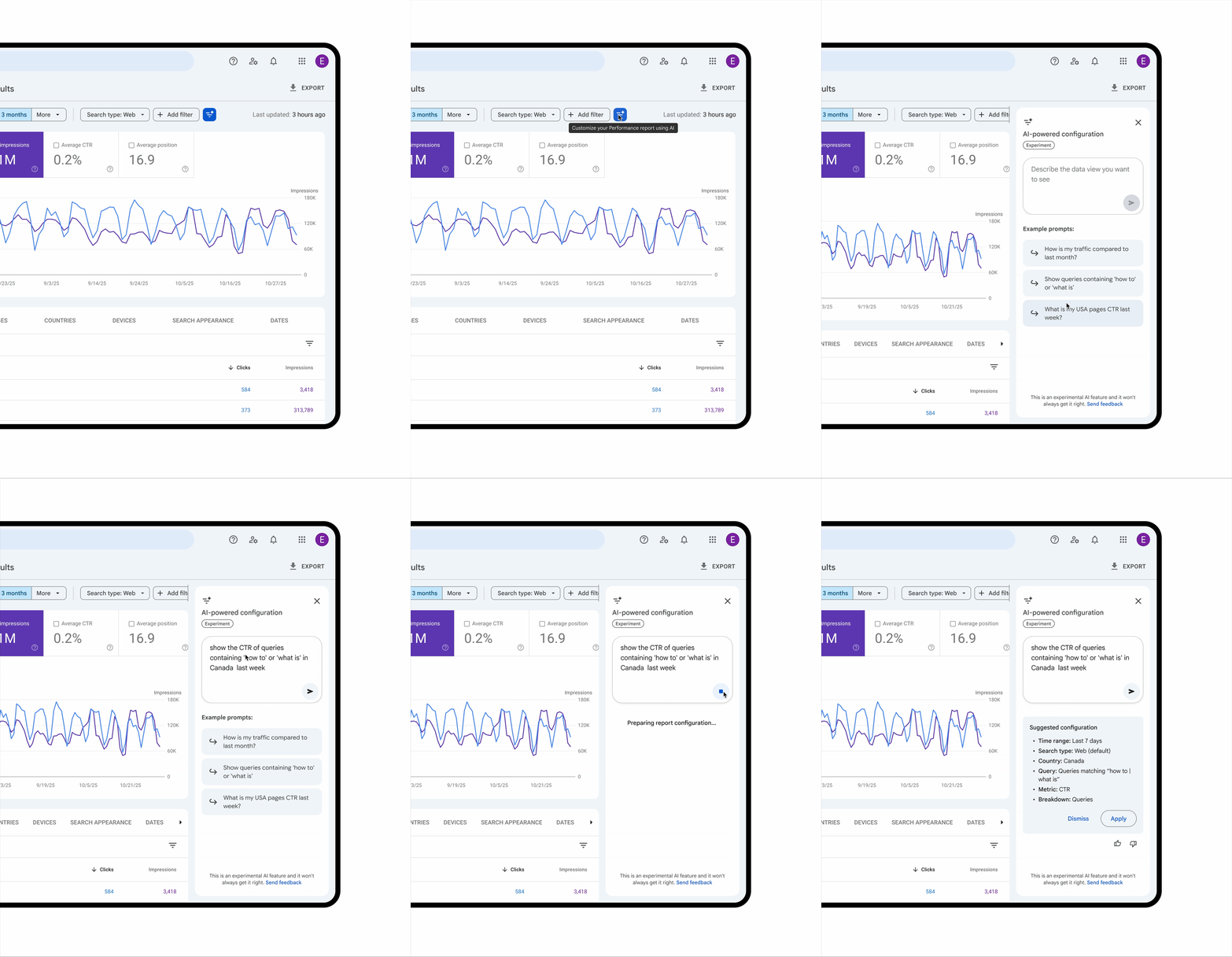
- Applying filters: Slice data by query, page, country, device, search appearance, or date range.
- Configuring comparisons: Handle tricky setups, like year-over-year traffic for specific pages.
- Selecting metrics: Pick from clicks, impressions, average CTR, or average position based on your ask.
Real-World Examples to Try
Google shared practical prompts to get you started. These show the power of everyday language:
- Targeted filtering: “Show queries on phone searches containing ‘sports’ in the last 6 months.”
- Complex comparisons: “Compare traffic for pages with ‘/blog’ this quarter vs. last year.”
- Metric selection: “Display average CTR and position for queries in India over 28 days.”
- Content-specific: “Show clicks for pages mentioning ‘Infidigit’.”
Test these once available, they turn vague hunches into precise insights quickly.
Current Limitations to Know
This is an experimental rollout, starting with a limited set of websites. Expect gradual expansion, but check your access soon. Key caveats include:
- Scope: Only works for Search results Performance reports, not Discover or News.
- Accuracy: AI might misread prompts, so always double-check suggested filters.
- No extras: It configures reports but skips sorting, exporting, or other actions.
Why This Matters for SEO Pros
Imagine spotting traffic drops on mobile in seconds, not scrolling endlessly. For e-commerce sites or content creators, this means more time optimizing and less fiddling with dashboards. It levels up data analysis, especially for quick checks on keywords or regions.
Tips to Maximize It
- Start simple: Use short, clear phrases for best results.
- Verify always: Scan AI-applied filters before diving into data.
- Combine with basics: Pair it with manual tweaks for deeper dives.
Embrace the Future of SEO Analysis
Google Search Console’s new AI tool changes everything. It turns hard-to-use Performance reports into easy questions you type in normal words. You get answers right away. Whether you track keywords as an SEO expert, check sales drops in areas as a shop manager, or improve content for phones as a writer, this saves tons of time and finds problems fast.
The update is rolling out now. Start using it soon. Try real questions, check the results, and make it part of your work. No more slow manual work, hello to fast, smart SEO!