













SEO has moved far beyond targeting short, generic keywords. Today, most searches are longer, more descriptive, and often phrased the way people naturally speak or think. These longer searches—commonly known as long-tail keywords—carry clearer intent and usually indicate that the user knows what they are looking for.
Google Search Console is one of the few tools that shows this behavior exactly as it happens. Instead of estimates or averages, it reveals the real queries users typed before landing on your website. When you know how to analyze this data properly, Search Console becomes an excellent source for uncovering long-tail keyword opportunities that already exist within your site’s visibility.
What Counts as a Long-Tail Query in Google Search Console
In Google Search Console, long-tail queries are not just “keywords with more words.” What matters more than length is intent.
A long-tail query often reads like a complete thought. It may describe a problem, compare options, or ask a specific question. These searches usually include context—details that narrow down exactly what the user wants—rather than vague terms.
Head keywords tend to be broad and competitive, while mid-tail queries add some clarity. Long-tail queries go a step further by removing ambiguity altogether. They often sit closer to decision-making or meaningful engagement.
Because these queries usually have low individual search volume, most keyword tools ignore them. Search Console does not. If a query triggers impressions for your site, it will appear there—making GSC one of the most accurate ways to understand how people are actually finding your content.
Step-by-Step to Find Long-Tail Keywords in Google Search Console
Step 1: Access the Right Report
Open Google Search Console and go to Performance → Search Results. Switch to the Queries tab to view the exact search terms users used to find your site. Set the date range to the last three months to ensure sufficient data for analysis.
Step 2: Apply Basic Query Filters (Optional)
Use the “contains” filter to quickly explore intent-based modifiers such as how, best, vs, or for. This helps you understand common query patterns, but it should only be used as an initial scan, not for deep analysis.
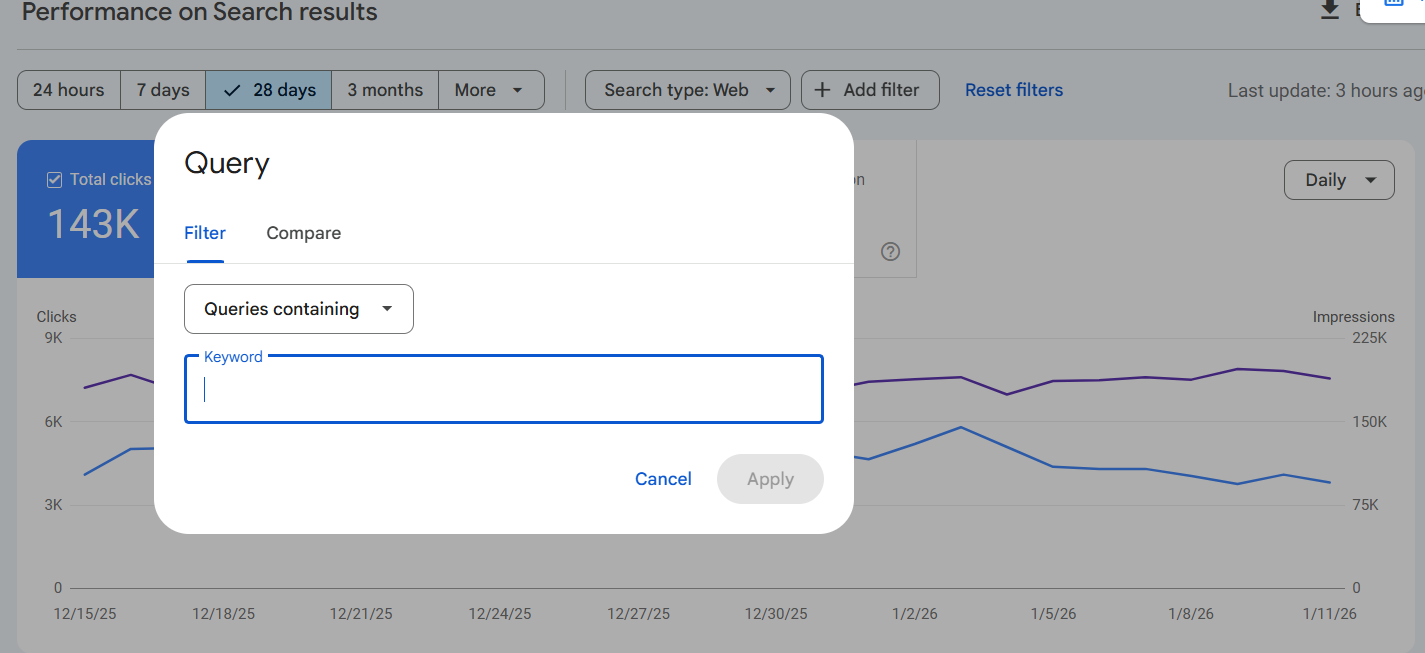
Step 3: Use Regex to Isolate Long-Tail Queries
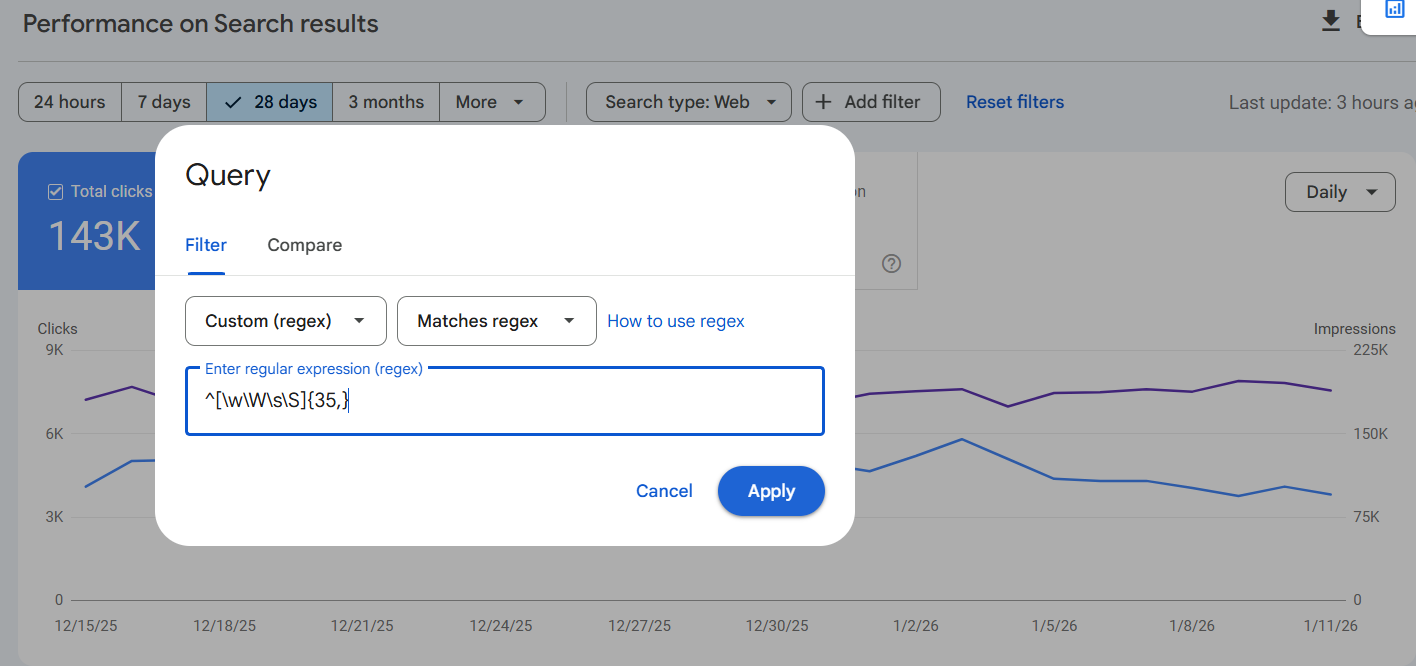
Apply a Custom (regex) filter to the Queries report. Use word-count–based regex patterns to surface longer, conversational queries. Adjust the threshold depending on how broad or specific you want the results to be.
Use this Regex: ^[\w\W\s\S]{35,}
Note: “35” means 35 Character
Refer Below Given Screenshots:
Results:
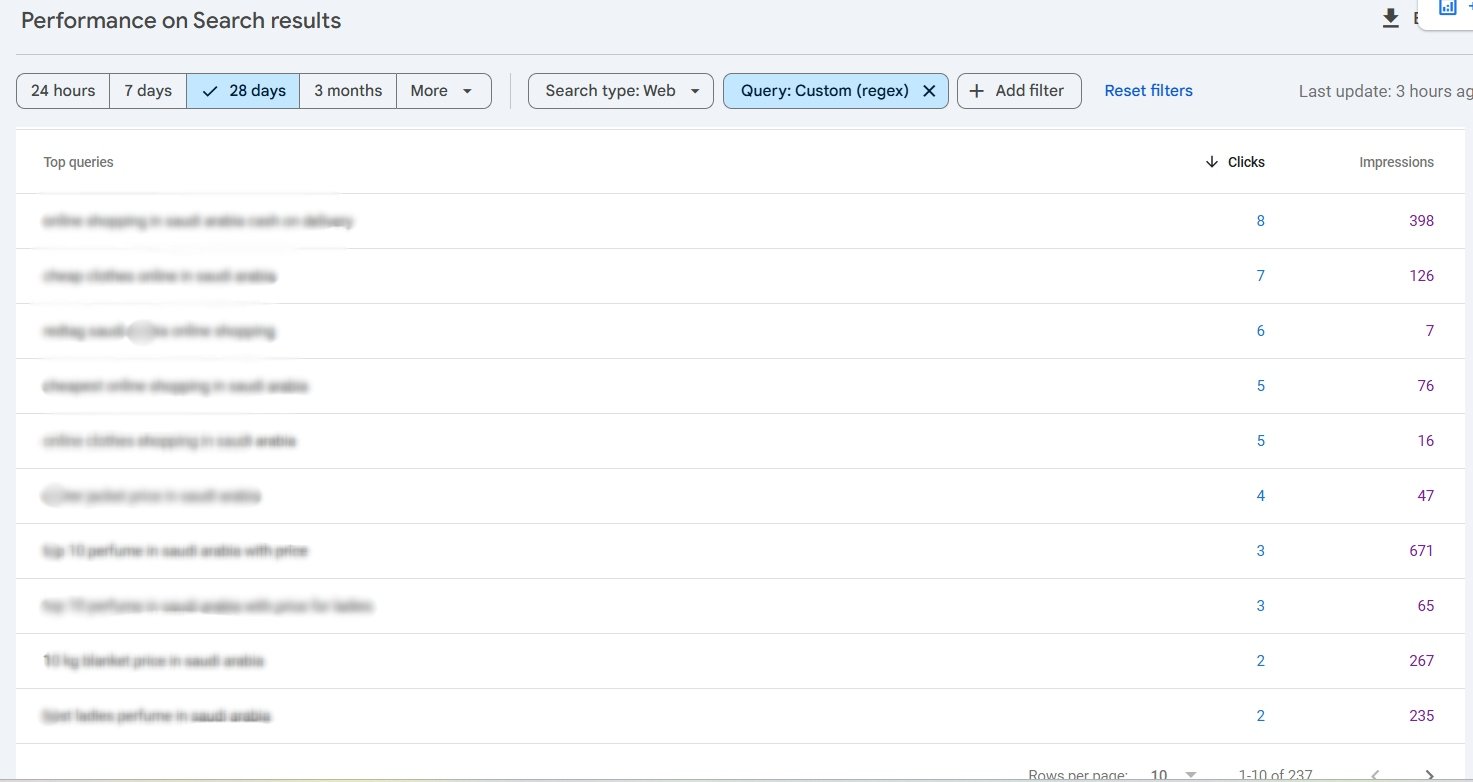
Step 4: Review and Prioritize Queries
Review the filtered queries and focus on those with clear intent. Prioritize queries with consistent impressions and average positions between 8 and 30, as these often represent strong optimization opportunities.
Why Search Queries Are Becoming More Conversational
Many SEOs have noticed that Search Console is now filled with longer, more natural-sounding queries than it was a few years ago. This isn’t accidental.
Users are increasingly influenced by voice search, AI-powered interfaces, and conversational tools. Instead of typing fragments, they search the way they speak or think. As a result, Search Console captures queries that resemble real conversations rather than keyword lists.
Even when these searches don’t show high volume individually, they reveal valuable patterns about user expectations. Ignoring them means overlooking how search behavior is actually evolving.
How to Use Long-Tail Keywords from GSC
Content Optimization
Improving Existing Content
Long-tail queries are ideal for refining pages that already receive impressions. By reviewing the queries tied to a page, you can expand explanations, clarify sections, or adjust headings so they better reflect what users are asking.
The goal is not to repeat the query word-for-word, but to answer it naturally and completely.
New Content Opportunities
When several long-tail queries point toward the same topic or problem, they often justify new content. Instead of creating separate pages for each query, group them by intent and address them in one comprehensive piece.
This approach strengthens topical authority and keeps your content focused and purposeful.
FAQs Question Opportunities
Search Console is especially useful for building FAQ sections. Many long-tail queries are already phrased as questions, making them easy to convert into FAQs that reflect real search behavior.
By answering these questions clearly on-page, you improve relevance, user experience, and long-tail visibility—without relying on assumptions about what users might ask.
Conclusion
Google Search Console is often underused as a keyword research tool. When analyzed properly, it provides direct access to long-tail and conversational queries driven by real users.
Using regex to filter query data makes it easier to uncover intent-rich searches that traditional tools miss. By applying these insights to content updates, new pages, and FAQs, you can align your site more closely with how people actually search today.
As search continues to move toward natural language and conversational input, this approach offers a practical and future-ready SEO advantage.