












Google Search Console just rolled out custom chart annotations, a simple tool that lets you add personal notes right on your performance graphs. This makes it easier to connect the dots between your site changes and traffic shifts.
Why Custom Annotations Matter
Ever stared at a sudden spike or drop in your Search Console clicks and wondered, “What happened then?”. Custom annotations act like sticky notes on your data charts, helping you track SEO experiments and external factors without digging through old emails or spreadsheets. They’re perfect for digital marketers juggling multiple sites, as they turn raw metrics into a clear story of your efforts.
This feature shines in busy workflows. For instance, if a core update hits or you launch a new content push, one quick note saves hours of guesswork later. Teams love it too; everyone with property access sees the same notes, keeping analysis aligned.
Real-World Use Cases
Annotations fit everyday SEO scenarios seamlessly.
- Site tweaks: Note template updates or migrations that might cause temporary dips, like “Switched to new CMS monitor crawl errors.”
- SEO wins: Log plugin installs, agency hires, or schema markup adds, such as “Added FAQ schema to 50 pages.”
- Content shifts: Mark intent refreshes, e.g., “Rewrote product pages for transactional queries.”
- Outside influences: Flag holidays, promotions, or news events, like “Black Friday sale launched.”
These examples show how annotations bridge gaps between actions and results, making performance reports more actionable for tracking keyword trends.
Step-by-Step: Adding Annotations
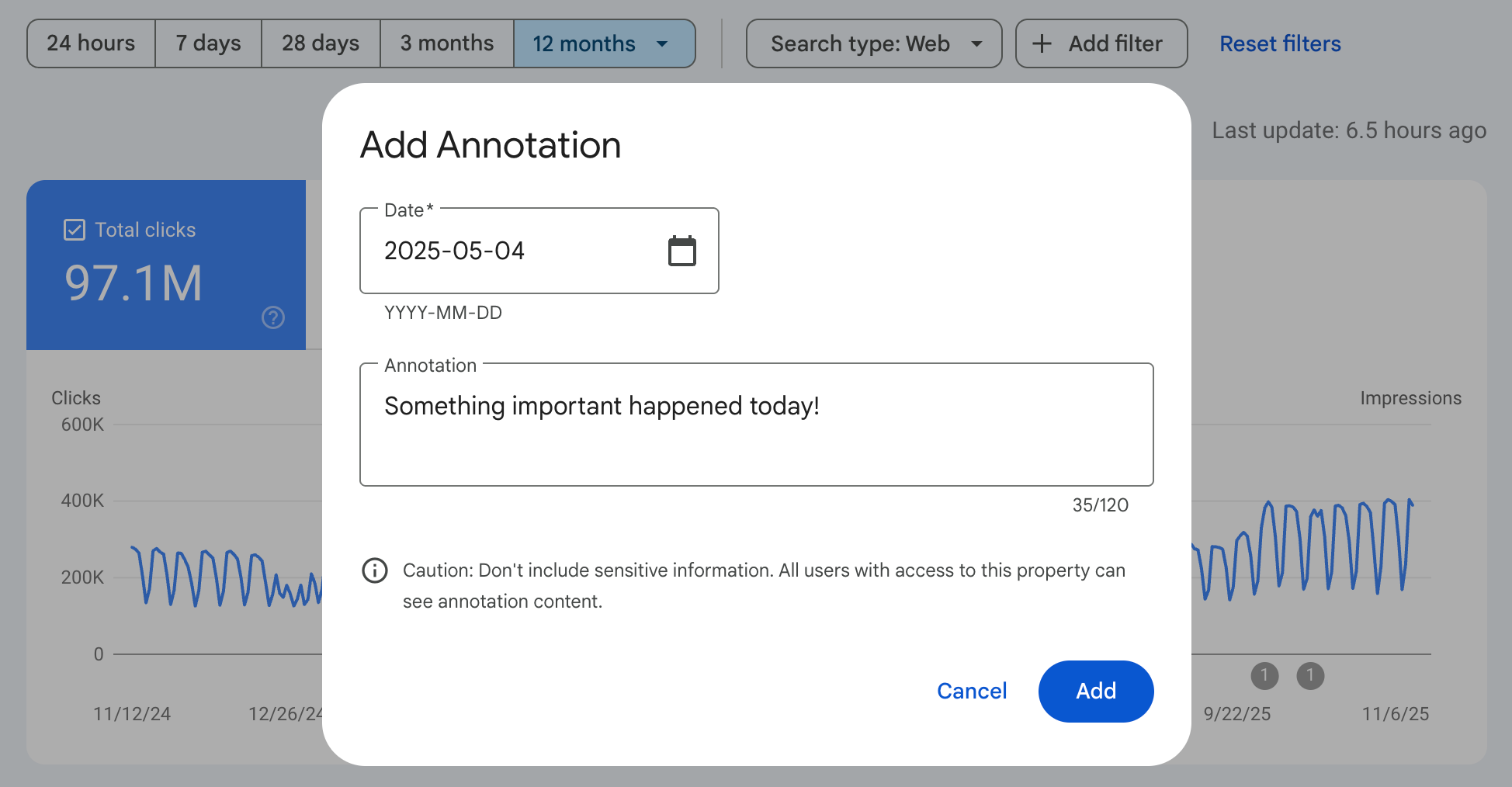
Getting started takes seconds in the Performance report.
- Open your site’s Performance overview in Search Console.
- Right-click any spot on the chart (clicks, impressions, etc.).
- Pick “Add annotation,” select a date, type your note (max 120 characters), and hit Add.
The marker pops up instantly as a visual pin. You can add up to 200 per property, plenty for most users. To delete, just click the marker and remove.
Key Tips for Success
Keep notes crisp and factual to avoid clutter, think “Fixed 404s on blog” over long rants. Skip sensitive details since they’re visible to all users on the property. For agencies, use them to document client work transparently.
Pair annotations with toggles for Google core updates to spot patterns fast, like ranking recoveries post-algorithm changes. This boosts data-driven decisions in GA4-linked setups.
Boost Your SEO Game Now
Start annotating today to build a timeline of your site’s journey. It transforms vague hunches into proven insights, helping refine strategies for better rankings and traffic. Experiment across properties and watch your analysis sharpen.